Terminal
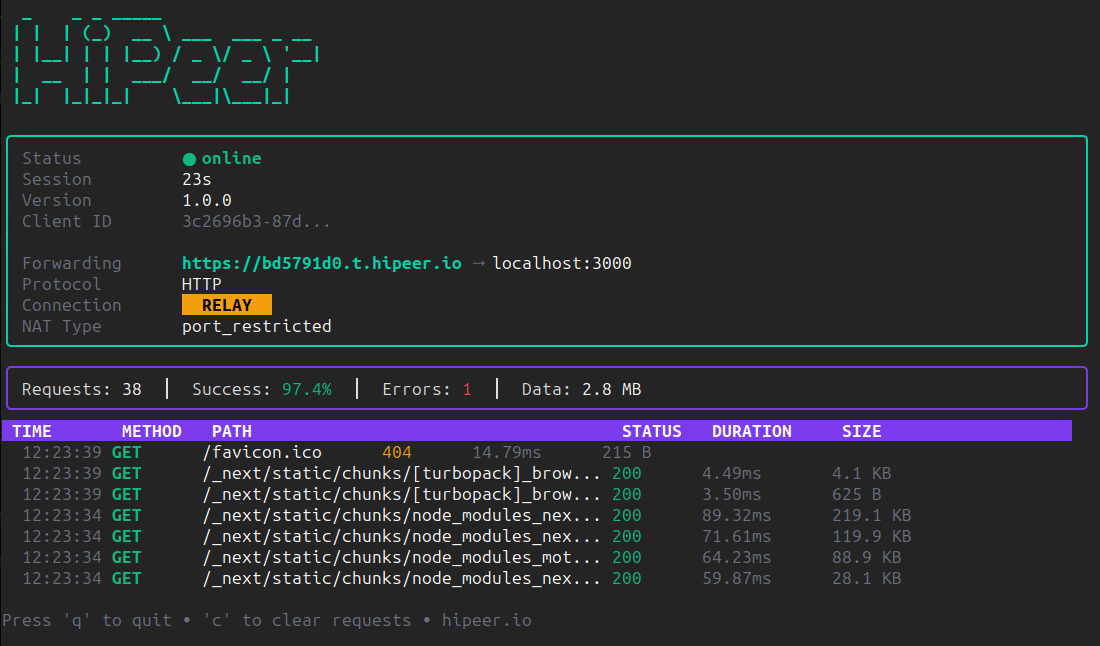
The tunneling technology trusted by developers worldwide. Secure, fast, and built for production workloads.
Enterprise-grade reliability with the simplicity developers deserve. Free plan available forever.
Direct P2P connections minimize round-trip time. Experience production-like performance during development.
TLS-secured tunnels with automatic HTTPS. Your traffic stays protected from endpoint to endpoint.
No accounts, no configuration files. Get a public URL in under 5 seconds.
Minimal flags, sensible defaults. Integrates seamlessly into any workflow or CI/CD pipeline.
Track requests, latency, and connection status directly in your terminal. Full observability built-in.
Native binaries for macOS, Linux, and Windows. Zero runtime dependencies.
Infrastructure deployed across multiple regions worldwide. Your tunnels connect through the nearest node for minimal latency. Drag the globe to explore.
10+
Edge Regions
<50ms
Avg Latency
99.9%
Uptime SLA
Single binary. Zero dependencies. Production-ready.
From localhost to production-ready URL in under a minute.
Download the binary for your platform and make it executable.
Make sure your application is running locally.
Run HiPeer and get your public URL instantly.
Your local server is now accessible from anywhere in the world!
| --port | Local port to expose (required) |
| --subdomain | Request specific subdomain |
| --protocol | Protocol: http, tcp (default: http) |
| --server | Custom server URL |
| --no-ui | Disable terminal UI |
Trusted by developers worldwide
Join thousands of developers already shipping faster with HiPeer.
Download Free